
DavosWeb3 2026: Voices Shaping the Next Wave of Decentralized Innovation
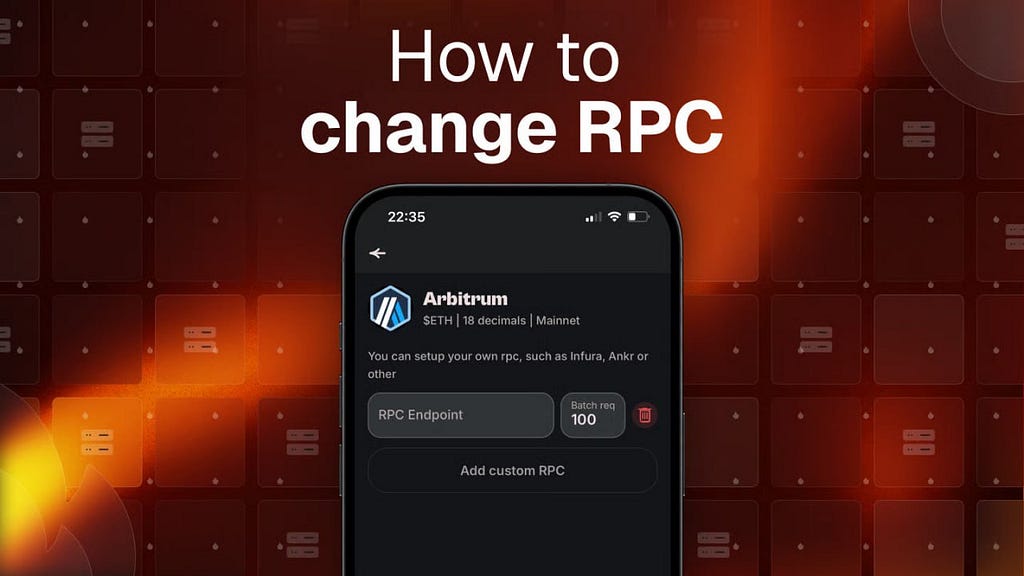
Why most users never bother changing RPC — and why the active ones do it in the first 30 seconds.
If you’ve ever waited 10–20 seconds for a transaction to confirm during a busy airdrop hunt, memecoin launch or market spike, you already know the pain of overloaded public RPCs.
In 2026, speed = money. Private or custom RPCs give you faster confirmations, lower failure rates, better privacy and almost zero rate-limits.
In this guide you’ll learn:
- what RPC actually is
- public vs private RPC differences
- step-by-step how to add/change custom RPC in HOT Wallet
- where to get reliable custom RPC endpoints (free & paid)
Let’s make your wallet noticeably faster.
What is RPC and Why Does It Matter in 2026?RPC (Remote Procedure Call) is the invisible bridge between your wallet and the blockchain.
Every time you:
- check balance
- send a transaction
- interact with a dApp
- claim an airdrop
…your wallet sends a request through an RPC endpoint.
Most wallets default to public RPCs provided by the chain or big infrastructure companies. They are free and work fine for casual use — until the network gets busy.
Then you get:
- delays (5–30+ seconds)
- “nonce too low” / “replacement transaction underpriced” errors
- rate-limit bans during hyped launches
Custom / private RPCs solve this by giving you a dedicated (or at least prioritized) connection.
Public vs Private RPC — Quick Comparison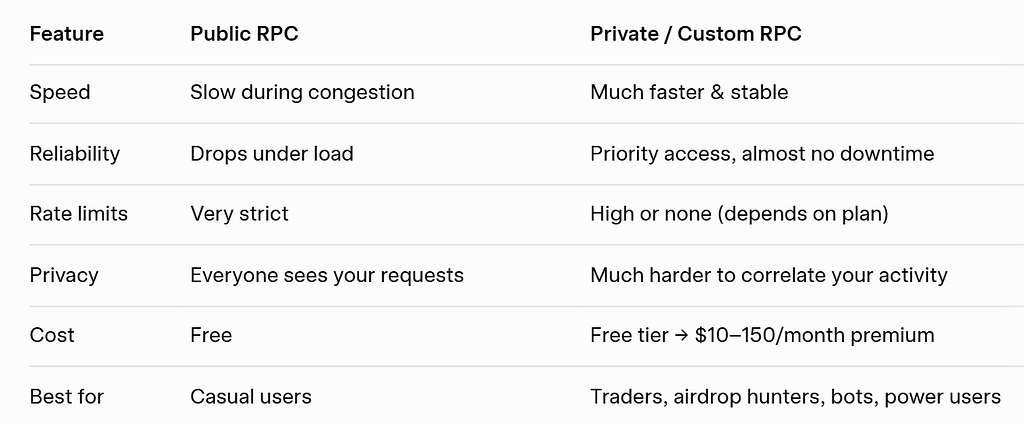 Step-by-Step: How to Add or Change Custom RPC in HOT Wallet
HOT Wallet has one of the cleanest and fastest ways to manage custom RPCs across multiple chains.
- Open HOT Wallet (mobile app or browser extension)
- Tap the gear icon → Settings
- Scroll down and select My Networks
- Choose the blockchain you want to customize (Ethereum, Polygon, BNB Chain, Arbitrum, Optimism, NEAR, Solana, etc.)
- Tap Edit → Modify RPC URL → Add Custom RPC
- Paste your custom RPC URL (you’ll get it from one of the providers below)
- Save → HOT Wallet will immediately start using your new endpoint
Done. Usually takes under 60 seconds.
Pro tip: HOT Wallet lets you store multiple RPCs per chain and switch between them instantly — very handy during high-load events.
Where to Get a Reliable Custom RPC in 2026Here are the most popular and stable providers right now:
- Infura — still the classic choice (free tier: 100k requests/day)
- QuickNode — very fast, generous free tier, excellent dashboard
- Blast (by Bware Labs) — great for Solana, NEAR, TON, Polygon
- Lava Network — decentralized RPC with good free limits
- Alchemy — strong free tier + advanced analytics
- Chainstack, Ankr, Moralis — solid alternatives
Many wallets support custom RPCs on paper — but the UX is painful: long menus, no multi-chain overview, no easy switching.
HOT Wallet does it differently:
- All networks in one clean list
- Instant switch between public ↔ custom RPC
- No need to re-add networks after update
- Works across 50+ chains from the same interface
- Built-in gas refuel if your chain runs out of native token
This turns “advanced setting” into a daily tool even beginners use.
Bottom LineAdding a custom RPC is one of the highest-leverage tweaks you can make in 2026. It costs nothing (or very little), takes ~1 minute, and gives you real edge during congested periods.
Your next step:
- Grab a free RPC from QuickNode or Infura
- Add it in HOT Wallet → Settings → My Networks
- Feel the difference on the next busy day
Got your own favorite RPC provider in 2026? Or maybe you already noticed speed difference after switching? Drop it in the comments — let’s share what actually works. ↓
Join the HOT Wallet community! Discuss, share your experience, and get fast answers:
- Discuss on Reddit →
- Watch video guides on YouTube → https://www.youtube.com/@hot-labs
- Follow news on X → https://x.com/hotdao
- Reels and quick tips on Instagram → https://www.instagram.com/hot_labs
- Get updates on Telegram → https://t.me/hotonnear
- Visit our site → https://hot-labs.org/
If you found this guide helpful or learned something new — I’d really appreciate your support!